Setup/Teardown
Set Up and Tear Down are virtual users (or threads in the JMeter language) that will execute before or after the main virtual user. They can be used to conduct preparation or cleaning actions that would be otherwise harder to schedule properly.
A 10 minutes test using both would have an Active users curve like this:

Warning
As you can see Set Up threads add up to the overall duration of your tests. Make sure to leave room for them to execute otherwise the Main threads might be stopped earlier at the end of the planned duration. Tear Down threads on the other hand will execute at the end of the planned duration.

Most of the settings on this screen are similar to what you can configure for the main virtual user, so we will only look at the ones specific to Set Up/Tear Down users. Please refer to the load and policies pages for information on others.
Note
The time spent in setup thread groups will be taken out of the total testing time, so make sure to take this into account when planning your tests. A good practice is to use the lifetime parameter to control how long it will last.
Scope
You have two options for the scope:
Localmeans every load generator during the test will execute a local Set Up/Tear DownGlobalmeans we will execute the Set Up/Tear Down on one load generator only, this is useful to conduct a unique action for the entire test.
Number of concurrent users
Here again two options:
Onemeans only one virtual user will be run. (or one per load generator if the scope islocal)Same as main VUmeans one Set Up/Tear Down per main virtual user (based on the maximum number specified in the load section), this is useful if you need to create a unique value for each user of the main virtual user. This allows a Ramp-up period to be selected.
Virtual user iteration behavior
Start from scratchto get rid of cache and cookies every iteration,Keep cache and cookiesto keep them when running several iterations.
Virtual user end
VU End decides when the Set Up/Tear Down user stops replaying its Virtual User:
VU duration: it replays it until its lifetime ends,VU duration / Max iterations: it stops after the number of iterations set in Max iterations, or earlier when its lifetime ends.
Virtual user lifetime
Lifetime has two options:
VU End: no time limit, the user runs until VU End stops it,Duration: the user runs for the number of seconds set in Duration in s.
This duration is the minimum AND maximum duration of each Set Up/Tear Down user.
It is a very good tool to control how much time is allocated for those. Otherwise the main virtual user could be delayed indefinitely if one of the Set Up/Tear Down users times out.
For example for a Set Up user with a ramp up of 1 minute and 2 minutes of lifetime, you know the main virtual user will start after 2 + 1 = 3 minutes have passed. And that way you can predict the time allocated to the main user for this test.
A more detailed explanation is that:
- Since it is a minimum duration, each Set Up/Tear Down user that would finish before reaching that time will wait until
lifetimeduration has been reached, - Since it is a maximum duration, each Set Up/Tear Down user that would not be done when
lifetimeduration has been reached will be forcefully shutdown.
The combination that never ends
VU End and Lifetime together decide when the Set Up/Tear Down user ends:
| VU End | Lifetime | The user ends |
|---|---|---|
VU duration |
Duration |
when the lifetime duration is reached |
VU duration / Max iterations |
VU End |
after the Max iterations |
VU duration / Max iterations |
Duration |
after the Max iterations or at the lifetime duration, whichever comes first |
VU duration |
VU End |
never: this combination is forbidden |
With VU duration and VU End, each setting waits for the other: nothing stops the user, and it replays its Virtual User forever. An endless Set Up keeps the main virtual user from ever starting, an endless Tear Down keeps the test from ever ending.
The form prevents it:
- While Lifetime is on
VU End, theVU durationbutton of VU End is disabled. Its tooltip reads Lifetime is VU End: with VU duration too, nothing would end the Virtual User. Set a Lifetime duration first. - While VU End is on
VU duration, theVU Endbutton of Lifetime is disabled. Its tooltip reads VU End is VU duration: with VU End too, nothing would end the Virtual User. Set Max iterations first.
To switch from one allowed combination to another, go through VU duration / Max iterations with Duration, where every button is enabled.
A scenario saved with this combination before the form forbade it opens with both fields in error: Nothing ends the Virtual User: set Max iterations or a Lifetime duration. under VU End, and Nothing ends the Virtual User: set a Duration or Max iterations. under Lifetime.
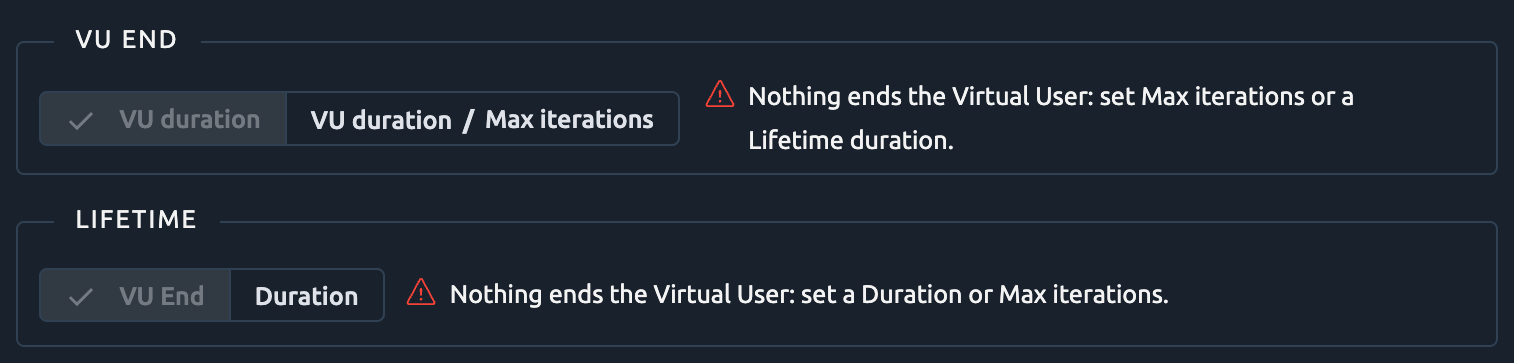
Set VU End to VU duration / Max iterations or Lifetime to Duration to save it. Such a scenario cannot be launched either: the scenario check refuses it.
Think times
Set Up/Tear Down users keep the think times of their own Virtual User, even when the think time of the user profile is overridden.
Warning
A Test Fragment used both by the main virtual user and by a Set Up/Tear Down user takes the overridden think time in both. To keep its own think times in the Set Up/Tear Down user, link a separate Test Fragment there.