K6 Script action
A K6 Script action holds one file of a K6 Virtual User: the entrypoint K6 runs, or a module it imports. A K6 Virtual User is made of these actions only, one per file:
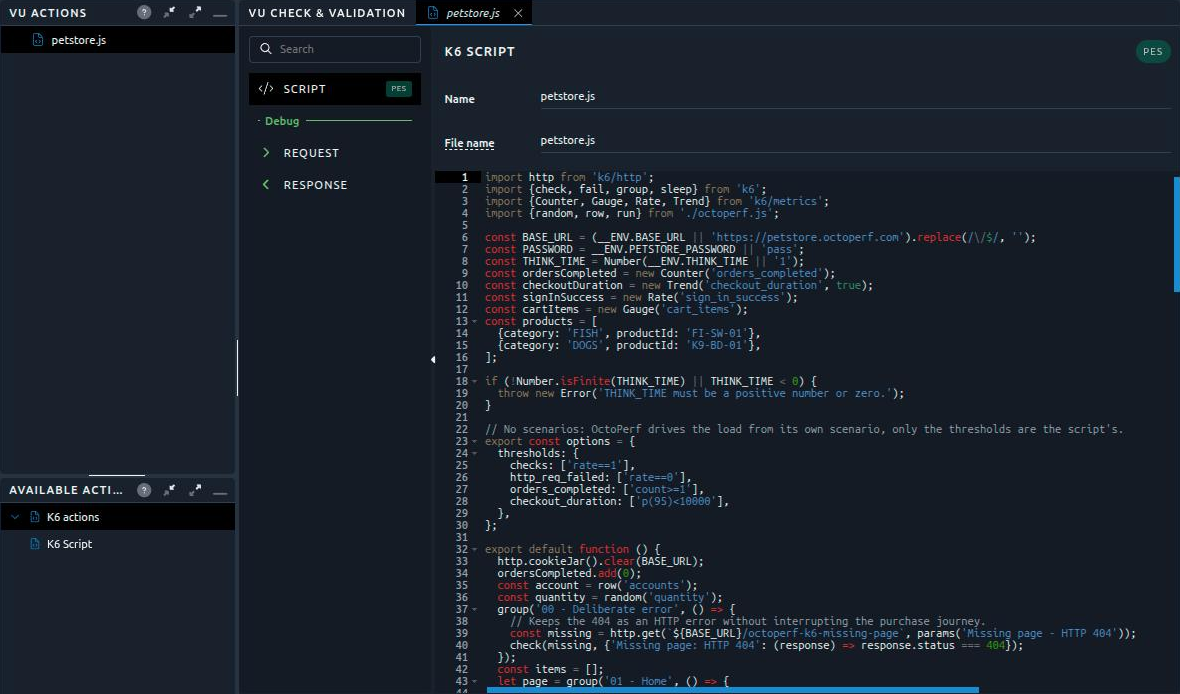
- The VU actions tree lists the files of the Virtual User. Click one to edit it.
- To add a file, drag K6 Script from K6 actions in the Available actions panel onto the tree. It comes with a sample script on our demo application.
- A disabled file is left out of the load generators, as any disabled action.
Script
Each action has a Name, shown in the tree, and a File name, the one K6 knows the file by:
- The file name is a relative path,
lib/checkout.jsfor instance, without..,\or spaces, ending with.jsor.ts. - Relative imports resolve by file name:
import { viewCatalog } from './petstore.js'reads the action whose file name ispetstore.js. octoperf.jsand the names starting with__octoperf_are reserved: OctoPerf generates those files next to the scripts.
The code editor checks the syntax of .js files as you type. TypeScript files are not checked, since the checker only knows JavaScript.
Auto-completion
Press Ctrl+Space in the editor to complete the K6 API, with the signature and the documentation of each function:
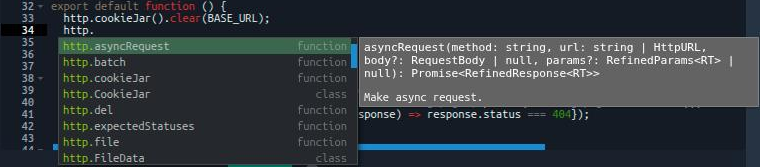
The completion also offers:
- snippets for the common statements: the
k6/httpand./octoperf.jsimports, the default function,http.get,http.post,check,sleep,group,row,csvandrandom, - the variables of the project, in the form a script reads them (see K6 variables and data):
__ENV.<name>for constants and secrets,row('<name>')for CSV variables,random('<name>')for random variables.
Info
The scenario always sets the load: the scenarios, vus, duration, iterations and stages of the script options are ignored at run time. The other options apply, the thresholds among them.
Custom metrics
The Trend, Counter, Gauge and Rate metrics a script declares with the k6/metrics module are collected during the test, along with the verdicts of its thresholds:
import http from 'k6/http';
import { Trend } from 'k6/metrics';

const catalogDuration = new Trend('catalog_duration', true);

export default function () {
  const res = http.get('https://petstore.octoperf.com/actions/Catalog.action');
  catalogDuration.add(res.timings.duration);
}
In the report, catalog_duration shows in the Custom Metrics section and can be charted over time: see Custom metrics. Keep metric names fixed: each load generator reports at most 100 of them, see K6 limits.
Debug
A validation captures the HTTP exchanges the script makes. Once it has run, open the Request and Response panels of the Debug section, then pick an exchange:
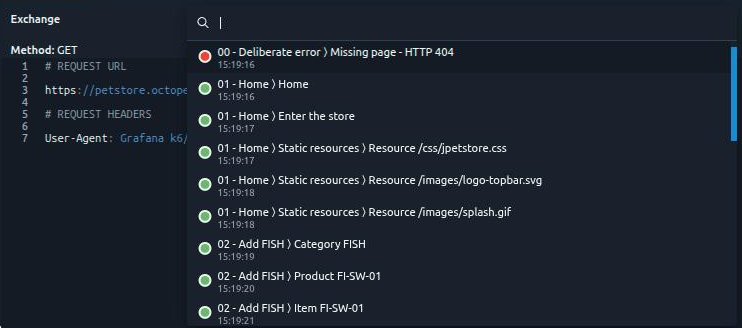
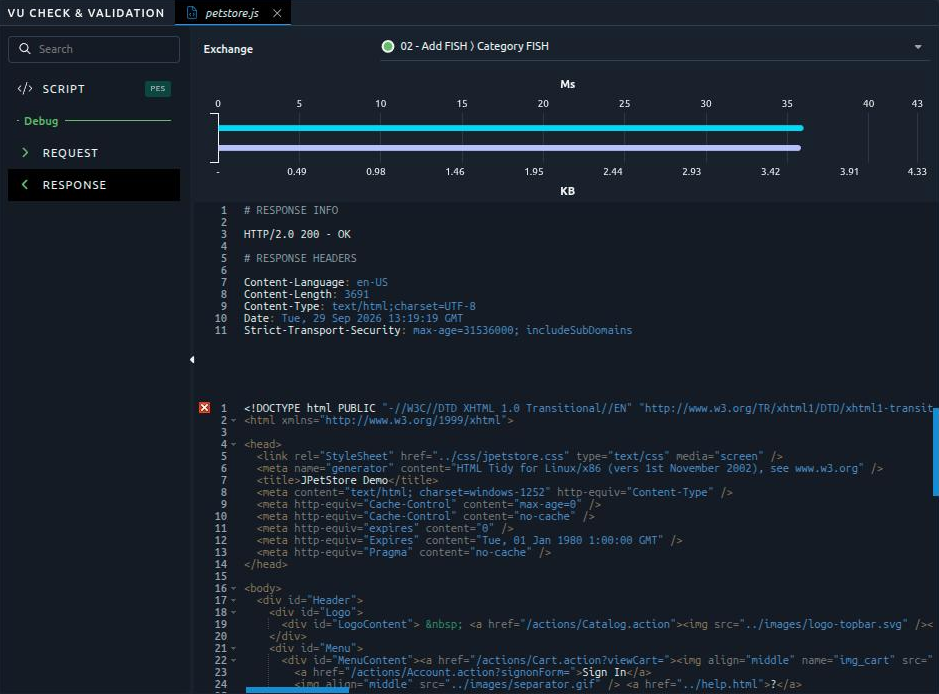
Each exchange is named after the group it runs in and the name tag of its request, and shows a green or a red dot depending on its status. The Response panel shows its timings, headers and body:
Download
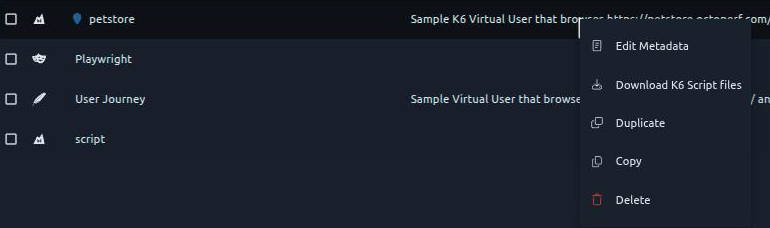
Download K6 Script files, in the menu of a K6 Virtual User in the Virtual Users list, downloads a ZIP file holding every script of the Virtual User in a folder named after it and prefixed with a number, such as 1_script, each under its file name:
Run it with k6
When the scripts import octoperf.js, the folder also holds what they need to run outside OctoPerf, with a local K6 installation:
| File | Content |
|---|---|
octoperf.js |
The same module as on the load generators: vars, random(), csv(), row() and run. |
__octoperf_data.js |
The random and CSV variables the scripts use, as configured in the project. |
| CSV files | The files of those CSV variables, taken from the Files Manager of the project. |
README.md |
How to run the folder. |
For example, a Virtual User made of script.js and petstore.js, reading the CSV variable products, downloads as:
1_script/
├── script.js
├── petstore.js
├── octoperf.js
├── __octoperf_data.js
├── products.csv
└── README.md
Unzip the file, then run the entrypoint from its folder:
k6 run -e BASE_URL=https://petstore.octoperf.com -e PASSWORD=secret script.js
The options of the script apply as they are, its scenarios included. To try the script once, add --vus 1 --iterations 1: these options replace the scenarios of the script.
A local run differs from a run on OctoPerf on a few points:
- Constants and secrets are not exported, so that no secret leaves the project: pass each one with
-e NAME=value, and the scripts read it through__ENVorvarsas usual. row()andcsv()read the whole CSV file: on OctoPerf, a CSV variable in Shared mode gives each load generator its own part of the file.rundescribes a local run:benchResultId,regionIdandinjectorIdarelocal, anduserProfileIndexis0.- Other project files are not exported: copy from the Files Manager any file the scripts open with
open()without a CSV variable on it.
Once your changes are tested locally, import the scripts again: you can select every .js file of the folder, as the import leaves out octoperf.js and the __octoperf_ files.
Sanity check
The sanity check reports the problems a K6 Virtual User would hit on the load generators:
| Message | Level | What to do |
|---|---|---|
| K6 VU must have at least one enabled Script action | Error | Add or enable a K6 Script action. |
| File name must be a relative path without '..', '\' or spaces, ending with .js or .ts | Error | Rename the file. |
| File name is reserved | Error | Rename a file called octoperf.js or starting with __octoperf_. |
| File name is used by several enabled scripts | Error | Give each script its own file name: K6 resolves the imports by file name. |
| File name is also the name of a project file | Error | Rename the script or the project file: the script would replace it on the load generator. |
| Script imports an extension the K6 binary of the load generators does not carry | Error | Remove the import. An xk6 extension is compiled into the K6 binary and cannot come from the project files: use a load generator image rebuilt with it, from the kit the octoperf/k6 image carries. |
| Script references a Counter variable | Error | Counter variables are not available to K6 scripts: use __VU, which numbers the virtual user, and __ITER, which numbers its iteration. |
| Script opens a file but no CSV variable of the project declares it | Warning | Declare a CSV variable on the file, or read it through row() or csv(): a file opened directly is not split between the load generators. |
| Script 'scenarios' are ignored | Warning | The OctoPerf scenario sets the load. Import Scenario converts the script scenarios into a scenario. |