Connected Apps
The Connected Apps page lists every third-party application you have authorized to access your OctoPerf account on your behalf - typically AI agents talking to the OctoPerf MCP server (Claude.ai Custom Connectors, Claude Code, Cursor, Continue.dev, ...).

Each row represents an active OAuth grant: a connector you signed in to through OctoPerf at some point, which now holds a refresh token tied to your user. The connector can call OctoPerf as you - with the same permissions your account has in the OctoPerf UI - until you revoke it or the refresh token expires.
Why This Matters
OAuth-authorized agents act with your identity. Reviewing this page lets you:
- Audit access: see which agents are currently connected.
- Detect drift: spot connectors you don't recognize or no longer use.
- Revoke compromised devices: cut off access from a lost laptop or a misconfigured tool immediately.
- Confirm activity: check when each connector last reached out so stale entries can be cleaned up.
Understanding the Information
For each connected application, you see:
- Application: the name the OAuth client registered with. Hovering shows the underlying
clientIdfor support / audit purposes. - Scopes: the OAuth scopes recorded against this grant. The MCP server does not currently enforce per-scope checks - this column is informational; an authorized connector can call any OctoPerf API your account has access to.
- Last activity: when the connector last refreshed its access token or called a tool.
- Expires At: the refresh-token expiry date. After this date the connector has to redo the full OAuth flow.
If the table is empty, the message "No third-party application is connected to your account." is displayed.
Revoking a Connector
- Find the row of the connector you want to remove.
- Click Revoke (or click the row directly).
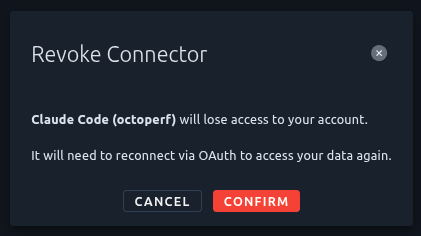
- Confirm in the dialog.
Revocation is immediate: the next tool call from that connector fails with 401, and the agent has to walk through the full OAuth flow to reconnect. Revoking does not delete the underlying OAuth client registration - only your grant against it. Other users who connected to the same client (different OctoPerf accounts authorizing the same Claude.ai connector, for instance) are unaffected.
Refreshing the List
Click Refresh to reload the list and see the latest activity. Useful when:
- You just authorized a new connector from another window and want to confirm it shows up.
- You want to verify a revoked grant has disappeared.
- You're checking the Last activity column to see whether a stale-looking grant is actually still being used.
Tips
- Review periodically: at least after each new device setup or password change.
- Match each entry to a real device or service: if you can't, revoke it and reconnect from the legitimate device only.
- Refresh tokens expire: connectors that haven't been used in a long time disappear naturally; you don't have to clean them up by hand.
Related Topics
- MCP Server overview: what the OctoPerf MCP server is and why agents need to be connected
- Connect a client: set up Claude.ai, Claude Code, Cursor, Continue.dev to access OctoPerf
- Account Sessions: manage your own web login sessions (separate from connector grants)
- Two-Factor Authentication: strengthen the OctoPerf account that backs every connector grant
- OAuth Clients (admin): administrator view of every registered OAuth client (self-hosted instances)