> OctoPerf Maven Plugin.
Source: https://api.octoperf.com/doc/runtime/edit-scenario/integrations-automation/ci-cd/maven/
# OctoPerf Maven Plugin
OctoPerf integrates with [Maven](https://maven.apache.org/), a leading open-source solution for building and organizing software development.
See the [OctoPerf Maven Plugin](https://github.com/OctoPerf/octoperf-maven-plugin) for more information.
## Prerequisites
Maven can be downloaded and [installed on any operating system](https://maven.apache.org/install.html).
Run a `mvn -v` to make sure it is properly installed before you proceed:

!!! tip
If you're running maven from your favorite [CI tool](https://en.wikipedia.org/wiki/Continuous_integration) you do not need to go through this step since it will be taken care of by the CI tool itself.
## Goals
Before we start, we need to pick one the **goals** provided by the [OctoPerf Maven Plugin](https://github.com/OctoPerf/octoperf-maven-plugin#goals-overview).
In this tutorial we will go for the `octoperf:execute-scenario` **goal**, this will allow us to execute a test from Maven.
Other goals allow you to use OctoPerf as a pure test runner and checkout your scripts from your source control prior to the test.
## Configuration
Only one section remains to be completed: editing the `pom.xml` maven configuration file. Let's create the `pom.xml` with the configuration needed to run `octoperf:execute-scenario` (see [octoperf:execute-scenario](https://github.com/OctoPerf/octoperf-maven-plugin#octoperfexecute-scenario) for more information):
```xml
4.0.0
pom
com.octoperf
octoperf-test
1.0.0-SNAPSHOT
com.octoperf
octoperf-maven-plugin
2.4.0
YOUR_API_KEY
WORKSPACE_NAME
PROJECT_NAME
SCENARIO_NAME
octoperf-snapshots
OctoPerf Snapshots
https://github.com/octoperf/maven-repository/raw/master/snapshots
octoperf-releases
OctoPerf Releases
https://github.com/octoperf/maven-repository/raw/master/releases
```
We need to replace the placeholders `WORKSPACE_NAME`, `PROJECT_NAME` and `SCENARIO_NAME` with proper values. Those can be found using OctoPerf's UI.
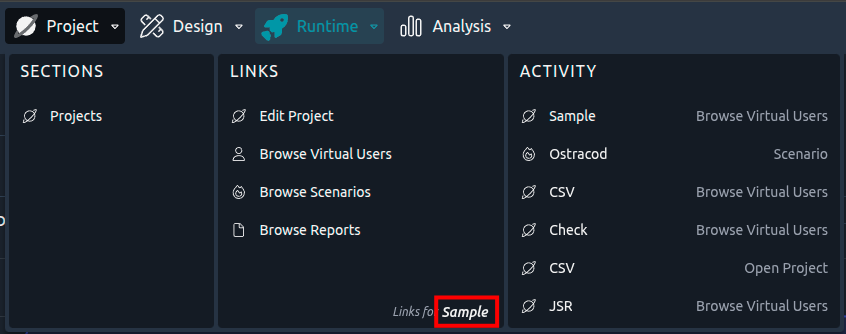
*Where to get the parameters from OctoPerf*
As a result we would have:
```xml
YOUR_API_KEY
Demo
MyProject
Standard
```
The **API Key** can be found on your [User Profile](https://api.octoperf.com/doc/account/profile/#apikey).
For more information on possible configurations available, see [Maven Plugin page](https://github.com/OctoPerf/octoperf-maven-plugin#usage).
!!! tip
It is possible to use the [command line to pass a parameter to Maven](https://www.baeldung.com/maven-arguments), typically to keep your API key secure you might not want it in a static file. In this case, add `-api YOUR_API_KEY` to the command line and inside the POM file use `${api}`.
## Execution
This step can be achieved by running a command line interface or bash, pointing to the folder where your pom.xml is located.
Then just run the command line specified in our documentation for this **goal**: `mvn octoperf:execute-scenario`
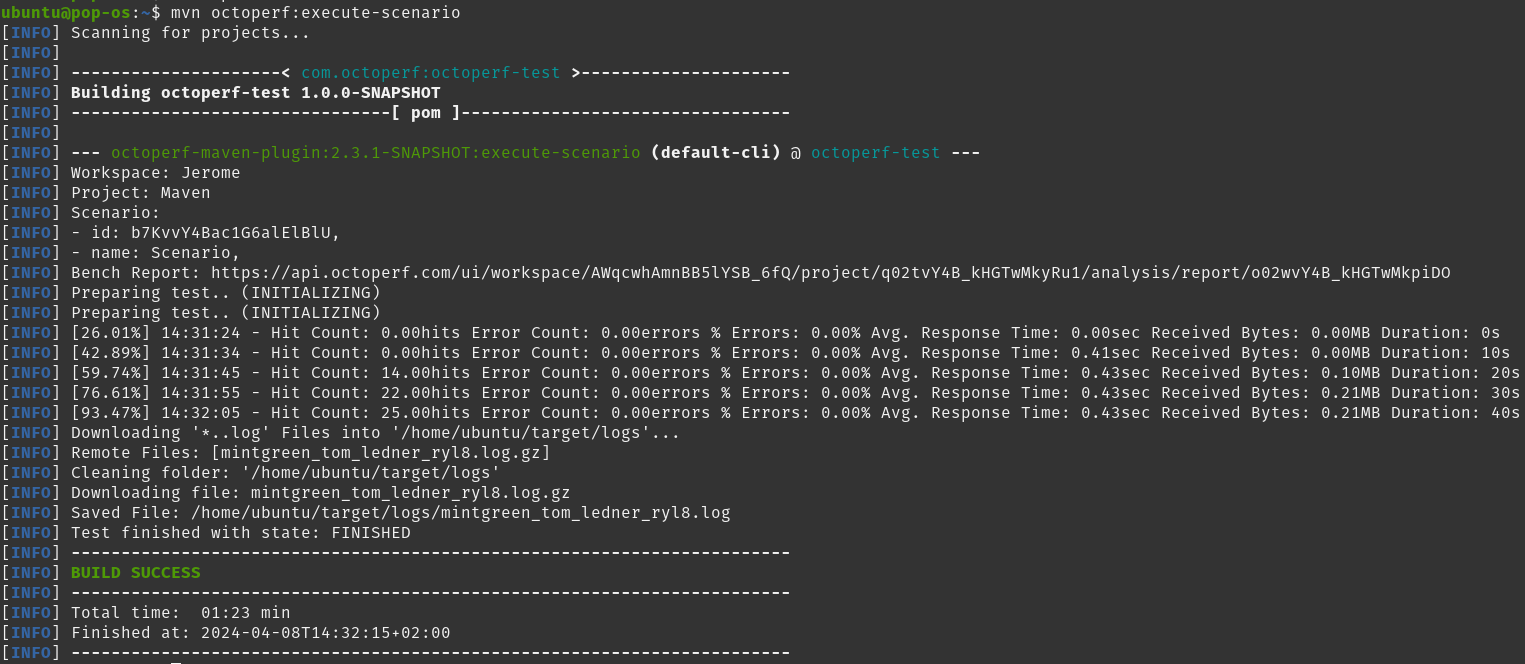
*Maven test runs*
When the test is finished or aborted you will see if the final result is on par with SLAs you defined:
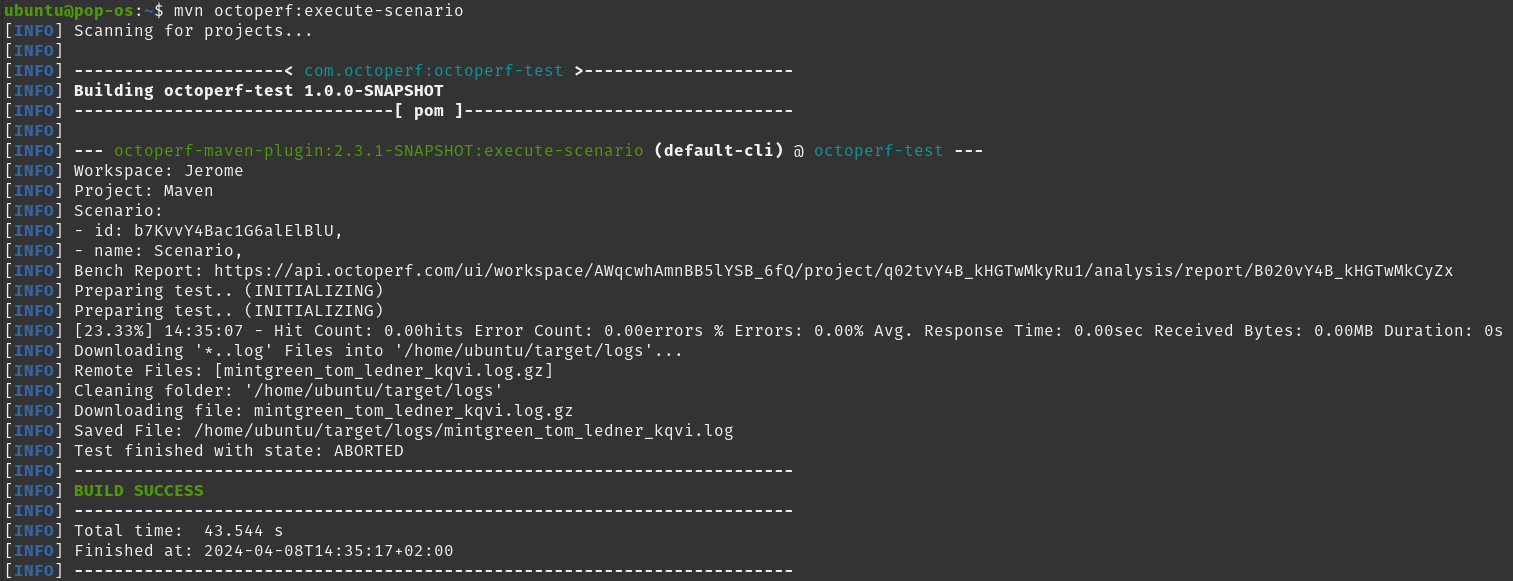
*Maven test finished*
The test logs and JUnit result will be downloaded automatically, along with the [JTL result files](https://api.octoperf.com/doc/runtime/edit-scenario/edit-user-profile/options/jmeter/#jtl) if you activated them.
### Ending the build
From plugin version `3.0.0`, two parameters of `execute-scenario` decide how the build ends:
- `failIfNotFinished`, `true` by default: a test that ends in `ERROR` or `ABORTED` fails the build. Up to `2.6.0`, such a test ended the build in success.
- `timeoutMinutes`, `0` by default: when the test has not ended after that many minutes, the plugin stops it and fails the build. `0` waits for the test to end, however long it takes.
!!! warning
A scenario with an **Error** in its [scenario check](https://api.octoperf.com/doc/runtime/edit-scenario/scenario-check/) never starts: `execute-scenario` fails the build at the launch, before any credit is consumed, with a message such as `Scenario cannot run: Buyer in Paris: No agent running in this location`. Open the scenario in OctoPerf to see the problems and fix them.
## K6 scripts
The `octoperf:import-k6` goal, from plugin version `3.0.0`, imports a [K6 script](https://api.octoperf.com/doc/design/create-virtual-user/import-k6-scripts/) as a Virtual User and creates the scenario its `options` describe, one user profile per K6 scenario. Chained with `wipe-project` and `execute-scenario`, the script kept in your source control runs on OctoPerf at every build:
```xml
com.octoperf
octoperf-maven-plugin
3.0.0
${api}
Demo
MyK6Project
OctoPerf
eu-west-1
${project.basedir}/script.js
${project.basedir}/lib/api.js
Scenario
30
```
```bash
mvn octoperf:wipe-project octoperf:import-k6 octoperf:execute-scenario -Dapi=YOUR_API_KEY
```
!!! warning
`wipe-project` deletes every Virtual User, file and scenario of the project first, so that each build does not add another Virtual User and scenario of the same name. Give the pipeline a project of its own.
| Parameter | Default | Description |
|-----------|---------|-------------|
| `k6Entrypoint` | `${project.basedir}/script.js` | The script `k6 run` starts from. |
| `k6Modules` | | The other scripts the entrypoint imports, all under the folder of the entrypoint. Each keeps its path relative to that folder, so the relative imports resolve. |
| `providerName` | | **Required.** The load generator provider every user profile runs from, as named in the workspace. |
| `location` | | **Required.** The location of that provider. |
| `scenarioName` | `Scenario` | The name of the created scenario, the one `execute-scenario` runs next. |
| `k6Executable` | `k6` | The `k6` binary: a bare name is looked up on the `PATH`, a relative path is resolved against the project. |
| `k6OptionsFile` | | The output of `k6 inspect --execution-requirements`, read instead of running `k6`. |
| `failOnUnconverted` | `true` | Fails the build when part of the load does not convert as it is. |
The `options` of the script are resolved on the build machine, by `k6 inspect --execution-requirements`, so `k6` must be installed there, unless `k6OptionsFile` points at a saved output of that command. OctoPerf only converts the resolved options: the script is not run during the import.
The conversion follows the [same rules](https://api.octoperf.com/doc/design/create-virtual-user/import-k6-scripts/#conversion-rules) as the web interface. Each part of the load that is not converted, approximated or ignored is logged as a warning and fails the build, unless `failOnUnconverted` is `false`. When no K6 scenario can be converted, the build fails whatever `failOnUnconverted` says.
For a complete overview of what you can achieve with this plugin, see the [OctoPerf Maven Plugin](https://github.com/OctoPerf/octoperf-maven-plugin) documentation.