> OctoPerf load testing - Device documentation page. How to configure the User Profile cache and bandwidth settings.
Source: https://api.octoperf.com/doc/runtime/edit-scenario/edit-user-profile/options/device/
# Device
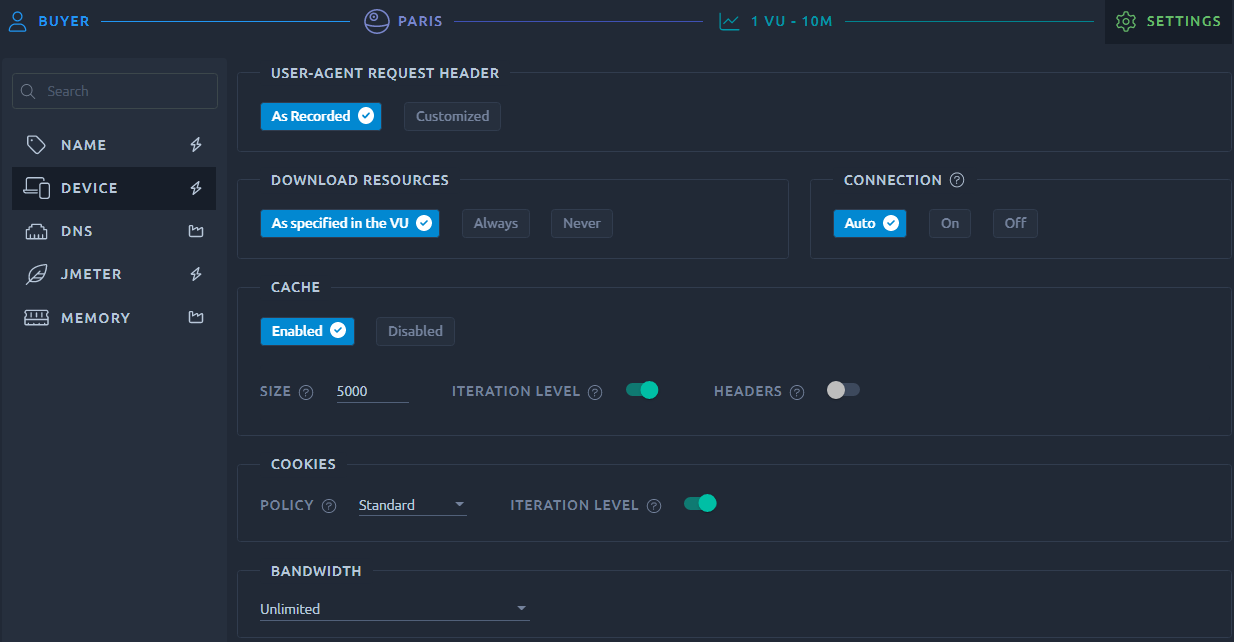
The device settings allow to mimic the behavior of a real browser:
## User agent
{ align=left }
Select the user agent header to simulate. **Modern applications may not look at the user agent anymore** but you can still use the `Customized` option to send a specific value for other purposes.
## Download resources
This parameter allows you to override the [Download resources](https://api.octoperf.com/doc/design/edit-virtual-user/action-types/http-actions/#download-resources) option of all your [HTTP actions](https://api.octoperf.com/doc/design/edit-virtual-user/action-types/http-actions/).
The possibilities are:

* **As specified in the VU**: Default option, uses the configuration of each HTTP action as defined on the [design screen](https://api.octoperf.com/doc/design/),
* **Always**: Forcibly enables the Download resources option for all requests,
* **Never**: Disables the Download resources option for all requests.
## Connection Keep Alive
{ align=left }
**Auto** means the TCP connection is **reset upon iteration end**. This is the default mode since one iteration represents a single real user. **On/off** means it will always be **kept/reset**.
## Cache
If enabled, allows you to configure the cache manager of this user profile:
* **Cache size**: defines the maximum number of elements the emulated cache should hold,
* **Clear cache on each iteration**: like cookies, clear cache when starting a new iteration,
* **Use HTTP cache control headers**: If activated, multiple similar HTTP GET may not be sent, in accordance to the cache control headers provided by the application.

## Cookies
Allows you to configure the [cookie manager](https://jmeter.apache.org/usermanual/component_reference.html#HTTP_Cookie_Manager) of this user profile:

* **Policy**: Select `Standard` for automatic cookie extraction and replacement or `Ignore` to deactivate automatic cookie management,
* **Iteration level**: When activated cleans the cookies each time a virtual user instance runs a new iteration.
!!! note
Several policies are actually identical when JMeter executes the test, typically `Best Match` and `Compatibility` will have the same effect. The same is true for the `Default` policy that also exists in JMeter, we decided not to add it to OctoPerf for that reason.
## Bandwidth
{ align=left }
Defines the network simulation in terms of the upload and download bandwidth. Network simulation allows to simulate **similar connection conditions as a real user would experience**.
!!! info
The bandwidth setting apply to each virtual user instance.