> OctoPerf load testing - Virtual User Validation documentation page. It helps you ensure that your Virtual User runs fine before starting a test.
Source: https://api.octoperf.com/doc/design/edit-virtual-user/validation/
# Virtual User Validation
The virtual user validation tool helps you ensure that your **Virtual User runs fine before starting a test**.
It is available in the [Main tab](https://api.octoperf.com/doc/design/edit-virtual-user/#main-tab) of every virtual user or using the **Run validation** button always visible on the upper right:
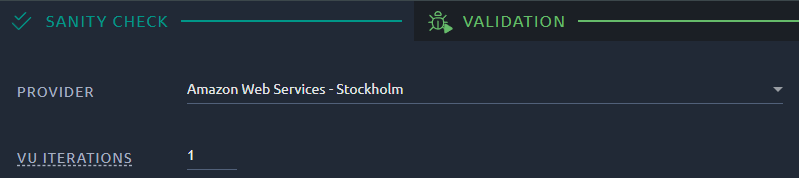
You can select the provider and the location where the Virtual User will run (you can add your own On-Premise Agents in the [Private Hosts page](https://api.octoperf.com/doc/on-premise-agent/)). The choice is made for this Virtual User only: it does not change the default location proposed when you create a scenario. To run a Virtual User Validation, click on the **Validate** button:
The **Validate** button becomes a **Stop** button and a progress bar is displayed. Wait a few seconds, while OctoPerf runs a single instance of the Virtual User and records the requests sent, and the responses received. You can configure your validate to run several iterations from the [Options](#options) section.
While the validate is running, clic **Open Logs** [to opens the Logs panel](https://api.octoperf.com/doc/analysis/edit-bench-report/test-logs/).
!!! note
The think times of HTTP requests are set to zero by default during a Virtual User validation, in the interest of time. Set a think time in the [Options](#options) to replay them. [Delay actions](https://api.octoperf.com/doc/design/edit-virtual-user/action-types/logic-actions/delay-action/) are always replayed.
## Options
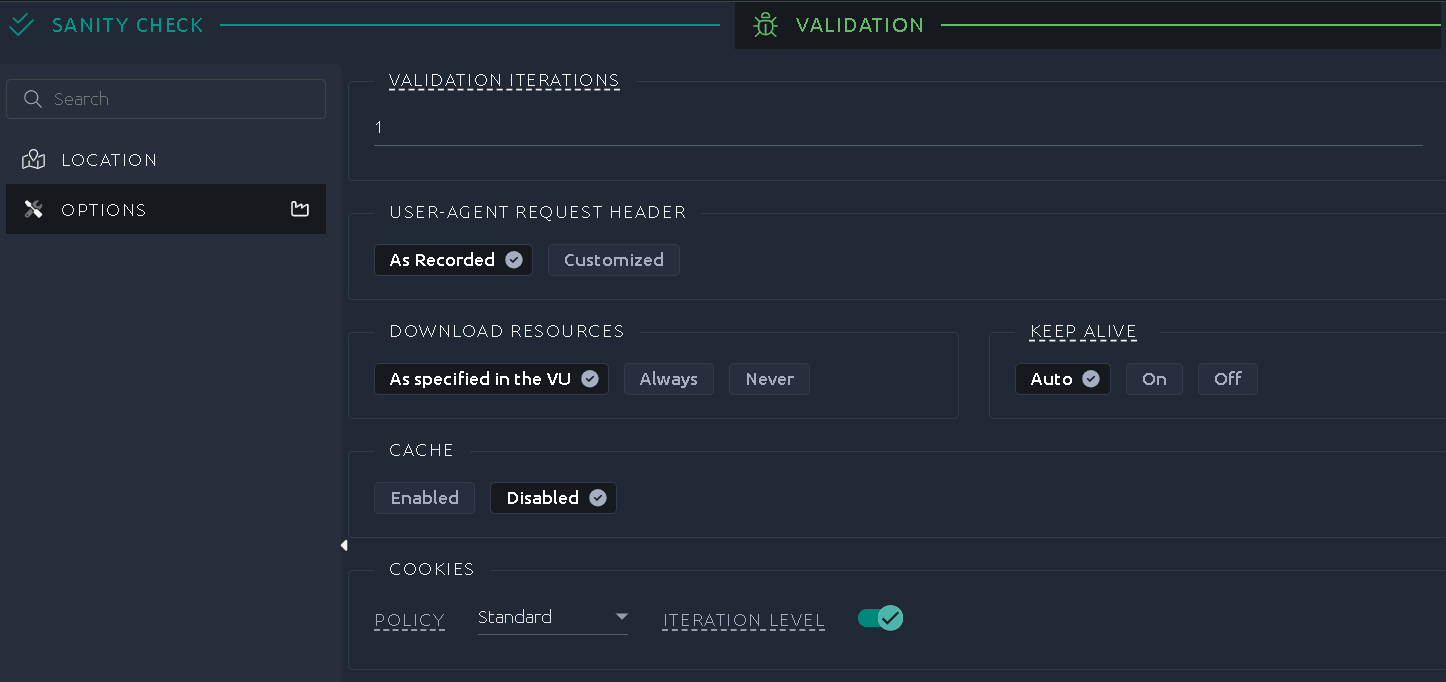
In this section, select how many iterations to run and the options the Virtual User runs with. They are the same options as the ones of a [user profile](https://api.octoperf.com/doc/runtime/edit-scenario/edit-user-profile/virtual-user/) in a scenario, so a validation can run exactly like a test does:
- [Browser settings](https://api.octoperf.com/doc/runtime/edit-scenario/edit-user-profile/options/device/) for a JMeter Virtual User, the device and timeouts for a Playwright one, the [script to start with and the run options](https://api.octoperf.com/doc/runtime/edit-scenario/edit-user-profile/options/k6/) for a K6 one,
- [Policies](https://api.octoperf.com/doc/runtime/edit-scenario/edit-user-profile/options/policies/): think time, pacing and error handling,
- [DNS](https://api.octoperf.com/doc/runtime/edit-scenario/edit-user-profile/options/dns/), [JMeter settings](https://api.octoperf.com/doc/runtime/edit-scenario/edit-user-profile/options/jmeter/) and [Set Up / Tear Down](https://api.octoperf.com/doc/runtime/edit-scenario/edit-user-profile/options/setup-teardown/).
The memory and the live reporting of a user profile do not apply to a validation, which always runs a single user.
!!! info
**An iteration is a complete run of the virtual user**, up until its last element is executed. By running several iterations you can check if datasets and other variables are properly updated.
### Remembered settings
Every validation run saves the provider, the location, the iterations and the options it ran with as the validation settings of the Virtual User: the panel reopens on them next time. **Reset to defaults**, under the list of panels, forgets them and comes back to the defaults of the Virtual User type. They are stored with the project, so every member of the workspace, on any computer, finds the same settings when opening the validation panel, and an AI agent validating the Virtual User through the [MCP server](https://api.octoperf.com/doc/mcp/) runs with them unless told otherwise. A copy of a Virtual User starts from the defaults of its type.
## Validation analysis
### Color code
{ align=left }
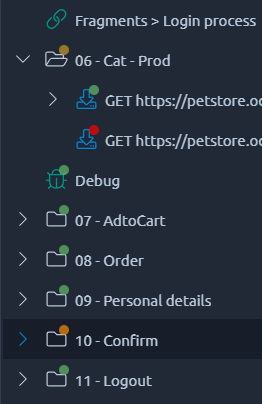
Once the execution starts, the Virtual User Validation displays colored dots on the left of each VU tree node that was executed:
- { .off-glb } The response is OK,
- { .off-glb } The response is KO,
- { .off-glb } At least one occurrence or children is KO.
!!! info
The absence of any dot indicates that this element was either not executed or that it doesn't have a result in itself (for example [if actions](https://api.octoperf.com/doc/design/edit-virtual-user/action-types/logic-actions/if-action/) do not have results).
### Error matrix
The following table indicates the situations considered as KO/Red during a validation.
Each line represents the validate response for a category of response time. For instance `2XX` for `200` and similar response codes.
`Unknown` response codes refers to codes that are outside the [list of standard codes](https://en.wikipedia.org/wiki/List_of_HTTP_status_codes).
Each column represents the recorded response code in a similar fashion.
| Validation code | No recorded | Recorded 2XX | Recorded 3XX | Recorded 4XX | Recorded 5XX | Recorded unknown |
|-----------------| --- | --- | --- | --- | --- | --- |
| 2XX | { .off-glb } | { .off-glb } | { .off-glb } | { .off-glb } | { .off-glb } | { .off-glb } |
| 3XX | { .off-glb } | { .off-glb } | { .off-glb } | { .off-glb } | { .off-glb } | { .off-glb } |
| 4XX | { .off-glb } | { .off-glb } | { .off-glb } | { .off-glb } | { .off-glb } | { .off-glb } |
| 5XX | { .off-glb } | { .off-glb } | { .off-glb } | { .off-glb } | { .off-glb } | { .off-glb } |
| Unknown | { .off-glb } | { .off-glb } | { .off-glb } | { .off-glb } | { .off-glb } | { .off-glb } |
If you want more details on how to analyze the errors, please check the [error table report item](https://api.octoperf.com/doc/analysis/edit-bench-report/report-items/errors-table/#understanding-errors) page.
!!! warning
During runtime, the responses will be evaluated based only on their response code, as if there was no recorded response.
Please refer to the first column of the table in that case.
### Logs
Using the [log panel](https://api.octoperf.com/doc/analysis/edit-bench-report/test-logs/) you can look for issues with your validation that are not visible in the tree. For instance if a [JSR Script](https://api.octoperf.com/doc/design/edit-virtual-user/action-types/jsr223-actions/) failed the error message will be in the JMeter log:
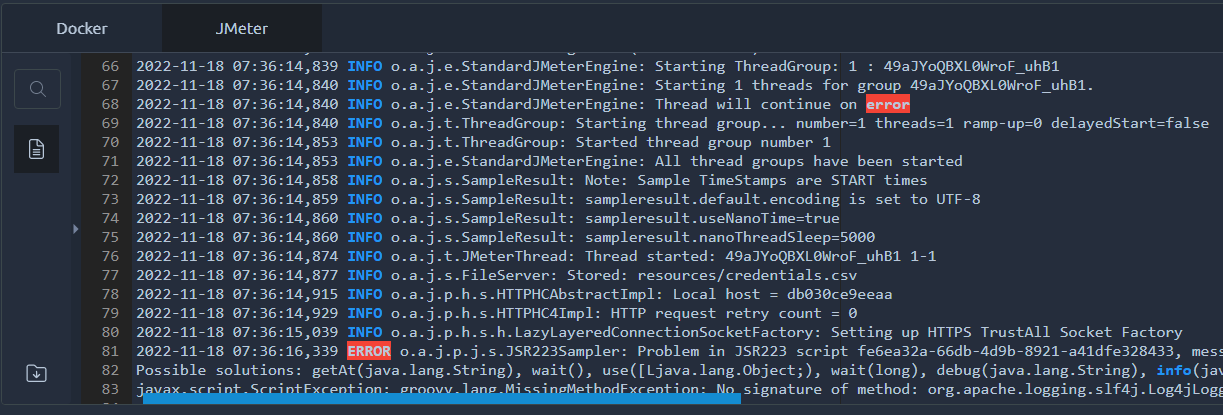
The log files show up a few seconds after the end of the validation, when the load generator stops. Until then, the *Files* tab shows *Waiting for files*.
### K6 Virtual Users
A K6 Virtual User is made of [K6 Script actions](https://api.octoperf.com/doc/design/edit-virtual-user/action-types/k6-actions/k6-script-action/), one per file, so the dots of the tree sit on its files rather than on its requests. The validation captures every exchange the script makes: the **Debug** section of the [K6 Script action](https://api.octoperf.com/doc/design/edit-virtual-user/action-types/k6-actions/k6-script-action/#debug) lists them, named after their `group` and their `name` tag, each with its own dot, its request and its response.
- **A request is KO** when it fails for K6: no response, or a response K6 does not expect, a status of 400 or more by default. No recorded response exists to compare it with, so the error matrix above does not apply.
- **A failed `check()`** is counted as a failed assertion, and does not turn the request red.
- **An error of the script**, an exception thrown during an iteration or a script that does not even start, turns the file where it happened red. Its exchange is named `INIT /` when the script fails before its first iteration, and its response holds the message of K6, with the file, the line and the column: `main.js:2:11 Unexpected token ;`.
The K6 log of the validation, in the [log panel](https://api.octoperf.com/doc/analysis/edit-bench-report/test-logs/), holds the output of `console.log` and every message of K6.
## Sanity check
The **sanity check** is a prerequisite to any Virtual User validation. In most situation it will not raise any issue and you won't even see it. It scans your virtual user to check if anything can break its execution (i.e. missing files) or can make your load testing results hard to analyze (i.e. empty or unnamed containers).
If invalid, it will prevent you from running validations and even tests.
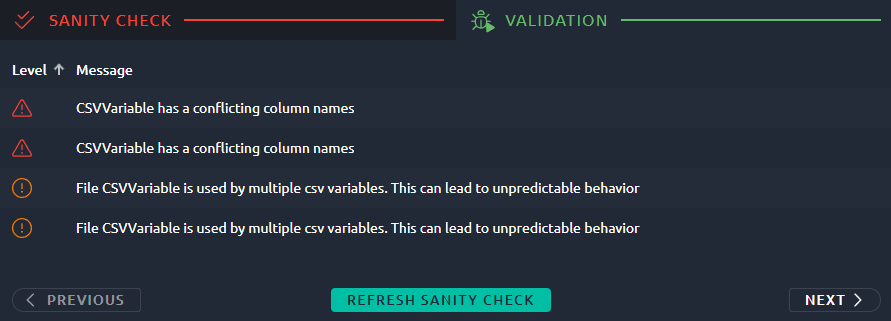
It displays a table that lists all errors with:
- The error level: INFO, WARNING or ERROR,
- A short message to help you identify the issue,
- An **Inspect** button to be redirected to the element causing the issue.
Once you fixed all the issues, you might need to hit "Refresh" and then "Next" to go back to the validation screen.
!!! info
The sanity check also runs in the **Check Design** step of the [launch wizard](https://api.octoperf.com/doc/runtime/edit-scenario/launch-test/#check-design), on every Virtual User of the scenario, including its [Set Up and Tear Down](https://api.octoperf.com/doc/runtime/edit-scenario/edit-user-profile/options/setup-teardown/) Virtual Users. The settings of the scenario itself, such as its providers, locations and load, are checked by the [scenario check](https://api.octoperf.com/doc/runtime/edit-scenario/scenario-check/).
The sanity check of each Virtual User also checks **every CSV variable of the project**, whether the Virtual User uses it or not: an Error on a CSV variable blocks the validation of all the Virtual Users of the project. The [CSV Variable Check](https://api.octoperf.com/doc/design/edit-virtual-user/configuration/variables/csv-validation/#problem-index) page lists all the problems of a CSV variable, including the problems in the content of its file, and how to fix them.
The messages below are those of JMeter Virtual Users. The sanity check of a K6 Virtual User has its own, listed in the [K6 Script action](https://api.octoperf.com/doc/design/edit-virtual-user/action-types/k6-actions/k6-script-action/#sanity-check) page.
### ERROR
If any error { .off-glb } is detected, the debugging of the virtual user is canceled. You need to fix it before running the validation once again.
| Message | Description |
| ------------------------------------------ | ------------------------------------------------------------ |
| Missing file for CSVVariable | A CSV variable of the project reads a file that is not among the files of the project. See [Missing file](https://api.octoperf.com/doc/design/edit-virtual-user/configuration/variables/csv-validation/#csv-file-missing). |
| Column name 'x' is used by multiple CSV variables. | CSV variables using the same column names will be impossible to differentiate at runtime. See [Column name used by several variables](https://api.octoperf.com/doc/design/edit-virtual-user/configuration/variables/csv-validation/#csv-column-conflict). |
| JSR223Action is empty | An empty JSR223 action can generate a lot of logging for no purpose. It is better to remove unnecessary JSR223 actions. |
| No Server Found | If you remove a server without removing the corresponding request, then it is impossible for us to launch the test. Note that this can only happen if you play with the API, otherwise we would remove all requests when removing the server. |
| Cyclic Dependency Detected! | When using fragments, it is possible to configure a cyclic reference by using a fragment within a fragment. This behavior would prevent us from parsing the virtual user before runtime which is why it is forbidden. |
### WARNING
Warning { .off-glb } message are meant to get your attention on potential issues.
| Message | Description |
| ------------------------------------------------------------ | ------------------------------------------------------------ |
| Clear Cookies before recording or manually remove Cookie header | If you haven't properly remove cookies before recording, you may end up reusing invalid session IDs. This can lead to unrealistic tests, so we recommend to remove the cookie header on your first request or make sure to clean cookies before recording. |
| The CSV file 'x' is empty. | If a CSV variable has an empty file, then there will be no values to distribute during the test. See [Empty file](https://api.octoperf.com/doc/design/edit-virtual-user/configuration/variables/csv-validation/#csv-file-empty). |
| 'x' End Of Value Policy is 'Stop VU' | In this situation, the Virtual Users stop when out of values. Make sure that's the expected behavior and that the files contains enough values. See [Stop VU at the end of the file](https://api.octoperf.com/doc/design/edit-virtual-user/configuration/variables/csv-validation/#csv-stop-vu). |
| file is missing for POST request | In this case a multipart POST request needs a file, but we cannot find it. Make sure the file name is correct, the path to the file (`/resources`) **doesn't need** to be specified. |
| Query parameter "x" looks already URL-encoded and will be encoded a second time: uncheck Encode or decode the value | A parameter with **Encode** checked already contains encoded characters, such as `%2C` or `%20`: the server would receive them encoded twice. The same message starts with `Body parameter "x"` for a parameter of a form body. See [Parameter already URL-encoded](#already-url-encoded). |
#### Parameter already URL-encoded {#already-url-encoded}
When **Encode** is checked on a parameter, OctoPerf encodes its name and value before sending the request. If you typed the value already encoded, it gets encoded a second time, and the server receives something else than expected.
For example, the value `a%2Cb%20c` (meaning `a,b c`) with **Encode** checked is sent as `a%252Cb%2520c`.
The sanity check reports a parameter whose name or value contains a `%` followed by two hexadecimal digits, such as `%2C`, `%3D` or `%20`. It checks:
- The query parameters of an [HTTP action](https://api.octoperf.com/doc/design/edit-virtual-user/action-types/http-actions/#query-parameters),
- The parameters of a form body, the [Urlencoded](https://api.octoperf.com/doc/design/edit-virtual-user/action-types/http-actions/#urlencoded) type of a POST request.
It ignores:
- A lone `%`, as in `100%`,
- The variables and functions, such as `${token}`,
- The parameters with **Encode** unchecked,
- The [Multipart](https://api.octoperf.com/doc/design/edit-virtual-user/action-types/http-actions/#form-data), [Raw](https://api.octoperf.com/doc/design/edit-virtual-user/action-types/http-actions/#raw) and [File](https://api.octoperf.com/doc/design/edit-virtual-user/action-types/http-actions/#file) bodies, whose values are sent as they are.
**How to fix it.**
- Uncheck **Encode** on the parameter, to send the value as you typed it,
- Or replace the value by its decoded form (`a,b c` instead of `a%2Cb%20c`) and keep **Encode** checked.
!!! note
The warning can show up on a value that is right as it is:
- A value that legitimately contains encoded characters once decoded, for example an address passed as a parameter of another one: `returnUrl=/page?q=a%20b`,
- A `%` typed as a plain character, followed by two characters that happen to be hexadecimal digits (0 to 9, A to F), such as `50%AB` or `20%DEAL`. `100%Off` is not reported, since `O` is not a hexadecimal digit.
In both cases, keep **Encode** checked and ignore the warning: it does not block the validation nor the launch of a test.
### INFO
Information { .off-glb } messages are pointing out problems that can become inconvenient later but that can usually be disregarded.
| Message | Description |
| ----------------------------------------- | ------------------------------------------------------------ |
| Host header and server host are differing | Some web servers will refuse your request if Host header and URL have different values. If required, use the search and replace to change the Host header of all requests. |
| Using a JMeter generic action | You have imported a generic action from JMeter, that's not an issue at all but you may have to check if its configuration is ok in OctoPerf. Path to files is `/resources` by default and any JAR file provided will be in `/lib/ext`. |
| XXX sec thinktime is high | A think time or a Delay action lasts 30 seconds or more. You have configured a very high think time or imported an HAR with a large pause somewhere, see the [HAR import maximum think time](https://api.octoperf.com/doc/design/create-virtual-user/har-recorder/#maximum-think-time). This may result in a long period of inactivity during your tests, which is why we prefer to warn you about it. |
| xxxxx should have a name | Unnamed elements will be displayed as `Unnamed` in the report. If you have several of them that could make the report difficult to understand. It is better to provide a proper name to every element. |
| xxxxx is empty | Empty nodes like controllers or other logic actions will never be executed, it is better to remove them. |
| HTTP Action has empty query parameter | Empty name and value for a parameter means you either misclicked and created one by mistake or you imported an HAR from a source that tends to add these unnecessary parameters. Either way, some web servers will fail your request in this situation so we prefer to warn you. |