> OctoPerf load testing - CSV Variable Check documentation page. What each problem found on a CSV variable means, and how to fix it step by step.
Source: https://api.octoperf.com/doc/design/edit-virtual-user/configuration/variables/csv-validation/
# CSV Variable Check

The **CSV variable check** reviews the CSV variables of your project. It looks for what would make a test fail or read unexpected values: a missing or empty file, a file that cannot be read, rows that do not match the columns of the variable, two variables that share a file or a column name...
Each problem shows as a message at the top of the CSV variable, and as an icon in the [list of variables](https://api.octoperf.com/doc/design/edit-virtual-user/configuration/variables/#variables-list). This page explains each problem in more detail, with the steps to fix it.
## When the check runs
The CSV variable check runs:
- When you open the **Variables** page, and each time you create, save or delete a variable,
- When you close a file opened with the **Edit** link of a message, so that the problem disappears once fixed,
- In the [sanity check](https://api.octoperf.com/doc/design/edit-virtual-user/validation/#sanity-check) of each Virtual User, and so in the **Check Design** step of the [launch wizard](https://api.octoperf.com/doc/runtime/edit-scenario/launch-test/#check-design).
The check covers **every CSV variable of the project**, whether a Virtual User uses it or not.
## Severities
Each problem has one of two severities:
| Severity | Meaning | Blocks the validation and the launch? |
|----------|---------|---------------------------------------|
| :material-alert-outline: Error | The test cannot run: the variable has no file, or its values cannot be told apart. | **Yes** |
| :material-alert-circle-outline: Warning | The test runs, but the Virtual Users may read unexpected or empty values. | No |
Since the check covers the whole project, an **Error** on a CSV variable shows in the sanity check of **every Virtual User** of the project: it blocks their validation, and the **Check Design** step of any launch, until it is fixed.
## Where the problems show
### List of variables
When at least one CSV variable has a problem, the list of variables shows a status column, headed by a double check mark. Each variable shows an icon:
- The icon of its worst severity, whose tooltip counts its problems, for example *2 warnings*,
- A discreet check mark when it has no problem.
The column is hidden when no variable has a problem.
### CSV variable
The top of a CSV variable lists its problems, one message each, the worst first. Below the message, links lead to the fix:
- **Edit** followed by the name of the file opens it in the text editor; **Preview** shows it instead when the file is larger than 1 MB. When you close the editor, the check runs again,
- **Show in Files** opens the file in the [Files](https://api.octoperf.com/doc/design/edit-virtual-user/configuration/files/) page,
- The names of the **other variables** in a conflict open them,
- The :octicons-question-24: icon, next to a problem in the content of the file, explains it in short.
## Problem index {#problem-index}
Every problem the CSV variable check reports, in the order of this page. Click a problem to read what it means and how to fix it.
| # | Problem | Severity | Message links |
|---|---------|----------|---------------|
| 1.1 | [Missing file](#csv-file-missing) | :material-alert-outline: Error | None |
| 1.2 | [Empty file](#csv-file-empty) | :material-alert-circle-outline: Warning | None |
| 1.3 | [Delimiter of several characters](#csv-multi-char-delimiter) | :material-alert-circle-outline: Warning | None |
| 2.1 | [Column name used by several variables](#csv-column-conflict) | :material-alert-outline: Error | The other variables |
| 2.2 | [File used by several variables](#csv-file-conflict) | :material-alert-circle-outline: Warning | The other variables |
| 3.1 | [Inconsistent column count](#inconsistent-column-count) | :material-alert-circle-outline: Warning | **Edit**, **Show in Files** |
| 3.2 | [Empty lines](#empty-line) | :material-alert-circle-outline: Warning | **Edit**, **Show in Files** |
| 3.3 | [Formula injection](#csv-injection) | :material-alert-circle-outline: Warning | **Edit**, **Show in Files** |
| 3.4 | [Byte order mark of another encoding](#bom-detected) | :material-alert-circle-outline: Warning | **Edit**, **Show in Files** |
| 3.5 | [Control characters](#control-characters) | :material-alert-circle-outline: Warning | **Edit**, **Show in Files** |
| 3.6 | [Encoding error](#encoding-error) | :material-alert-circle-outline: Warning | **Edit**, **Show in Files** |
| 3.7 | [File cannot be checked](#validation-error) | :material-alert-circle-outline: Warning | **Edit**, **Show in Files** |
| 4.1 | [Stop VU at the end of the file](#csv-stop-vu) | :material-alert-circle-outline: Warning | None |
## 1. File {#file}
### 1.1 Missing file {#csv-file-missing .rule .rule-error}
:material-alert-outline: Error
The variable reads a file that is not among the files of the project. With no file, the variable has no value to give: no Virtual User of the project can be validated, and no test can be launched.
> Missing file for CSVVariable
**What it means.** No file is selected in the variable, or its file was deleted or renamed in the [Files](https://api.octoperf.com/doc/design/edit-virtual-user/configuration/files/) page. A variable with no file also shows the [Empty file](#csv-file-empty) warning.
**How to fix it.**
- Upload the file again in the CSV variable,
- Or select another file of the project,
- Or delete the variable if no Virtual User uses it anymore.
### 1.2 Empty file {#csv-file-empty .rule .rule-warning}
:material-alert-circle-outline: Warning
The file has no value to give. The test runs, but the Virtual Users get no value from this variable.
> The CSV file 'credentials.csv' is empty.
**What it means.** The file has no line of values: it is empty, holds only blank lines, or holds only the column header.
**How to fix it.** Upload a file that holds values, or select another file of the project.
### 1.3 Delimiter of several characters {#csv-multi-char-delimiter .rule .rule-warning}
:material-alert-circle-outline: Warning
The **Delimiter** of the variable has more than one character. The content of the file is **not checked**: the problems of [section 3](#content) are not reported.
> Delimiter ';;' has multiple characters — is this a typo? CSV content was not validated.
**What it means.** A delimiter is usually a single character, such as `,`, `;` or `|`. A longer one is often a typo. The two characters `\t` are not: they stand for a tab, a single character, and raise no warning.
**How to fix it.**
- Fix the **Delimiter** of the variable if it is a typo,
- Or, if the file really uses this delimiter, review its content yourself: OctoPerf cannot check it.
## 2. Conflicts between variables {#conflicts}
### 2.1 Column name used by several variables {#csv-column-conflict .rule .rule-error}
:material-alert-outline: Error
Several CSV variables of the project name a column the same way. Each column is a variable of its own, used as `${column}`: when two variables define it, the Virtual Users cannot tell which value to use.
> Column name 'username' is used by multiple CSV variables.
>
> Conflicting variable: credentials.
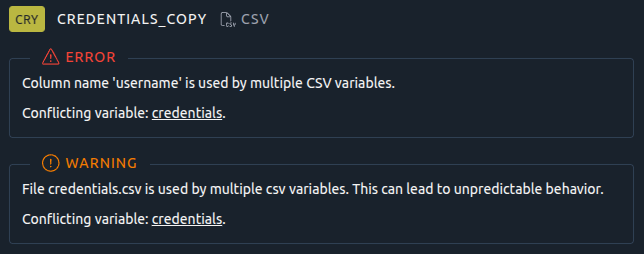
**What it means.** For example, the variable *accounts* has the columns `username` and `password`, and the variable *customers* has the columns `username` and `phone`. Both define `username`.
**How to fix it.**
- Rename the column in one of the variables, in its [column headers](https://api.octoperf.com/doc/design/edit-virtual-user/configuration/variables/csv/#variables), then update the Virtual Users that use it. For example, rename `username` to `customer_username`,
- Or, if the columns hold the same data, merge the two variables into one.
The message lists the other variables of the conflict: click one to open it.
### 2.2 File used by several variables {#csv-file-conflict .rule .rule-warning}
:material-alert-circle-outline: Warning
Several CSV variables read the same file. The lines of the file are shared between them: each line goes to one variable only, so each variable seems to skip the lines read by the others, and the file runs out faster than expected.
> File credentials.csv is used by multiple csv variables. This can lead to unpredictable behavior.
**What it means.** For example, the variables *accounts* and *customers* both read `credentials.csv`. See the warning of the [End of file policy](https://api.octoperf.com/doc/design/edit-virtual-user/configuration/variables/csv/#end-of-file-policy).
**How to fix it.**
- Give each variable its own copy of the file, for example `credentials_accounts.csv` and `credentials_customers.csv`,
- Or merge the variables into one, if they read the same data.
If sharing the lines between the variables is what you want, you can leave this warning.
## 3. Content of the file {#content}
OctoPerf reads the file with the **Delimiter** and the **Encoding** of the variable, and reports the problems it finds, with the lines concerned. All of them are warnings: the test runs, but the Virtual Users may read wrong values.
!!! info
The check reports at most 20 problems per file. Once you have fixed them, check the file again: other problems may show.
!!! tip
A spreadsheet software often hides these problems. Open the file in a text editor, or with the **Edit** link of the message, to see its real content.
### 3.1 Inconsistent column count {#inconsistent-column-count .rule .rule-warning}
:material-alert-circle-outline: Warning
Some lines do not have as many fields as the variable has columns. On these lines, the values shift to the wrong columns.
> 1 lines in file 'credentials.csv' have inconsistent column counts (expected: 2). Affected lines: 8
**What it means.** Usually, a value holds the delimiter without being quoted:
```csv
username,email
user1,user1@example.com
user2,my,wrong@example.com
```
**How to fix it.**
- Enclose the value in double quotes: `"my,wrong@example.com"`, and check that [Quoted data allowed](https://api.octoperf.com/doc/design/edit-virtual-user/configuration/variables/csv/#quoted-data-allowed) is on,
- Or use a delimiter that the values never hold, such as `;` or `|`,
- Or remove the trailing delimiters at the end of the lines.
### 3.2 Empty lines {#empty-line .rule .rule-warning}
:material-alert-circle-outline: Warning
The file has blank lines. A Virtual User that reads one gets empty values for this iteration.
> 2 empty lines found in file 'credentials.csv' at lines: 3, 6
**What it means.** Blank lines often come from a manual edit, a paste, or an export that adds blank lines at the end of the file.
**How to fix it.** Delete the blank lines, including those at the end of the file.
### 3.3 Formula injection {#csv-injection .rule .rule-warning}
:material-alert-circle-outline: Warning
Some values start with `=`, `+`, `-`, `@`, `|` or `%`. A spreadsheet software reads them as formulas, which is a security risk for whoever opens the file there. The test itself is not affected.
> 2 CSV injection(s) detected in file 'data.csv' at lines: 2, 3. Found: =, +
**What it means.** The value may be harmless, such as a negative number (`-5`) or a password that starts with `@`, or a formula that was not meant to be there.
**How to fix it.**
- Remove the character when it is not part of the value,
- Or, when the values are meant, leave this warning: the Virtual Users send them as they are.
!!! warning
Do not prefix the values with a quote (`'=value`) to protect them: the Virtual Users would send the quote as part of the value.
### 3.4 Byte order mark of another encoding {#bom-detected .rule .rule-warning}
:material-alert-circle-outline: Warning
The file starts with a byte order mark, an invisible sequence that names its encoding, and this encoding differs from the **Encoding** of the variable. The values, starting with the column names, may be read wrong.
> Byte Order Mark (BOM) detected in file 'data.csv'. BOM encoding: UTF-16LE, Configured encoding: UTF-8. Encoding mismatch may cause issues
**What it means.** For example, the file was saved as UTF-16 while the variable reads UTF-8.
**How to fix it.**
- Set the **Encoding** of the variable to the encoding named by the message,
- Or save the file again in the encoding of the variable: UTF-8 when the encoding is left blank.
### 3.5 Control characters {#control-characters .rule .rule-warning}
:material-alert-circle-outline: Warning
Some values hold invisible, non-printable characters. The Virtual Users send them as part of the values, which the tested server may reject.
> 1 control character(s) detected in file 'data.csv' at lines: 4. Found: 0x00
**What it means.** These characters often come from a copy and paste, or from an export by another application. Tabs and line breaks are not reported.
**How to fix it.**
- Delete the characters from the lines named by the message: a text editor that shows the invisible characters helps,
- Or export the data again from its source.
### 3.6 Encoding error {#encoding-error .rule .rule-warning}
:material-alert-circle-outline: Warning
The file cannot be read with the **Encoding** of the variable. Accented and special characters, such as `é` or `ñ`, are read wrong.
> File 'data.csv' cannot be read with encoding 'UTF-8'. Input length = 1
**What it means.** The file was saved in another encoding, often ISO-8859-1 or Windows-1252, while the variable reads UTF-8.
**How to fix it.**
- Set the **Encoding** of the variable to the encoding of the file,
- Or save the file again as UTF-8, without byte order mark, and leave the encoding blank.
### 3.7 File cannot be checked {#validation-error .rule .rule-warning}
:material-alert-circle-outline: Warning
OctoPerf could not read the file to check it. This problem is rare.
> Failed to validate file 'data.csv': ...
**What it means.** The file may be damaged, or an unexpected error occurred while it was read.
**How to fix it.**
1. Save the CSV variable again, or close and open the **Variables** page: the check runs again,
2. If the problem stays, export the file again from its source, save it as UTF-8 and upload it again,
3. If it still stays, contact the support with the file.
## 4. Settings of the variable {#settings}
### 4.1 Stop VU at the end of the file {#csv-stop-vu .rule .rule-warning}
:material-alert-circle-outline: Warning
The [End of file policy](https://api.octoperf.com/doc/design/edit-virtual-user/configuration/variables/csv/#end-of-file-policy) of the variable is **Stop VU**: each Virtual User that reaches the end of the file stops. When the file has fewer lines than the test needs, the number of running Virtual Users drops before the end of the test.
> 'credentials' End Of Value Policy is 'Stop VU'
**What it means.** This warning reminds you of a choice, which may be what you want: for example, to log each account in only once.
**How to fix it.**
- Check that the file holds enough lines for the whole test, and leave the warning,
- Or set the policy to **Recycle**, so that the Virtual Users loop back to the first line.
## Related documentation
- [CSV Variable Configuration](https://api.octoperf.com/doc/design/edit-virtual-user/configuration/variables/csv/): the settings of a CSV variable
- [Files](https://api.octoperf.com/doc/design/edit-virtual-user/configuration/files/): upload and edit the files of the project
- [Sanity check](https://api.octoperf.com/doc/design/edit-virtual-user/validation/#sanity-check): the check of a Virtual User, which includes this one