> OctoPerf load testing - Response Assertion documentation page. Response Assertions validate that server HTTP responses satisfy conditions during load test execution.
Source: https://api.octoperf.com/doc/design/edit-virtual-user/action-types/post-processors/response-assertion/
# Response Assertion
Response Assertion Post Processors lets you **check that the HTTP responses satisfies one or several conditions**.
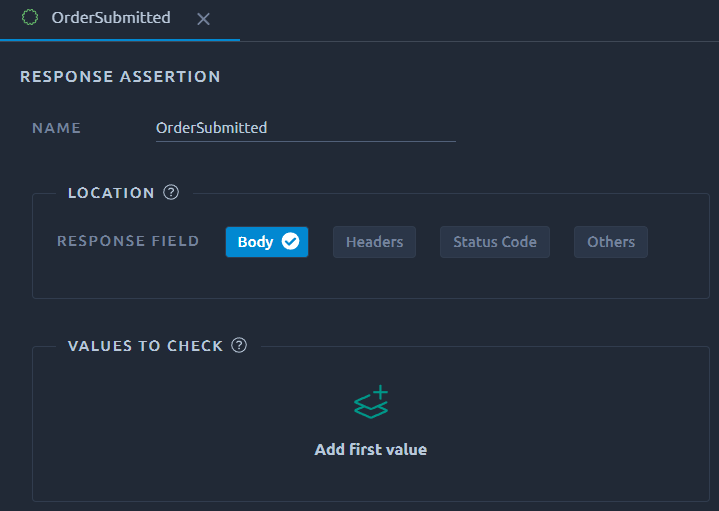
## Location

This section lets you decide on which part of the HTTP Response this **Response Assertion** is going to apply.
Selecting **Others** opens a list of less common criteria that you can also use.
## Values to check
The response assertion can be applied to one or more values. It is possible to either use the picker or directly enter the value to assert.
When using the picker, keep in mind you can switch from recorded to validate using the **Source** select box.
### Body
This option opens the recorded response body and allows you to select the value you want to assert.
### Headers
The header picker is slightly different since it allows selection of a particular header and will copy `: ` in the Response assertion.
### Status code
This option is focused the [HTTP response code](https://developer.mozilla.org/en-US/docs/Web/HTTP/Status):
### Others
When dealing with other types of locations, or if you've already picked a value, it is also possible to edit the value directly in the field.
!!! warning
Be extra careful since all Regexp reserved characters must be escaped for **Contains** and **Matches** [Matching rules](#matching-rule).
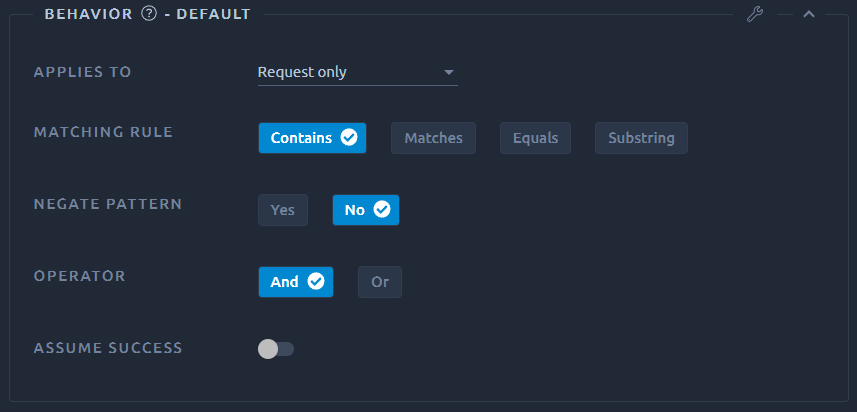
## Behavior
### Applies to
This option allows you to apply this response assertion on the main request and/or children of the main request.
!!! note
This is only relevant if the parent HTTP Request action has the [Download resources/Follow redirects](https://api.octoperf.com/doc/design/edit-virtual-user/action-types/http-actions/#settings) option enabled. Otherwise there will not be any children request.
### Matching rule
* **Contains**: true if the text contains this value, can use regular expressions,
* **Matches**: true if the whole text matches this value, can use regular expressions,
* **Equals**: true if the whole text equals the pattern string (usually in combination with the [Status Code Location](#status-code)),
* **Substring**: true if the text contains the pattern string.
### Negate pattern
Select **Yes** to reverse the search. This can be useful to check you **do not have** an error message.
### Assume success
At runtime, any 4XX or 5XX response code will fail the corresponding response. Activating this option will make the status of this response a success, whatever the response code was. It will also override the result of previous assertions. Make sure to only use it on the first assertion of a given request.
This option doesn't require a [Value to check](#values-to-check) to be provided. If you do add one, it will be applied **on top of the assume succes**, so the assertion may still result in a failed status, if this value cannot be found.
Example usage:
- Ignore all response codes for a particular request,
- Decide if the response is a success independently from the response.
!!! warning
When running a validation, we will also compare the response code to the recorded request.
Because of this the [status of the response may still be failed](https://api.octoperf.com/doc/design/edit-virtual-user/validation/#error-matrix).
## Debug
Opening the debug panel allows you to quickly see the result of your assertion. Make sure to check it every time you make a significant change:
