> OctoPerf load testing - Flow Control Action documentation page. Flow Control Actions are used to control how often the children actions are executed.
Source: https://api.octoperf.com/doc/design/edit-virtual-user/action-types/logic-actions/flow-control-action/
# Flow Control Action
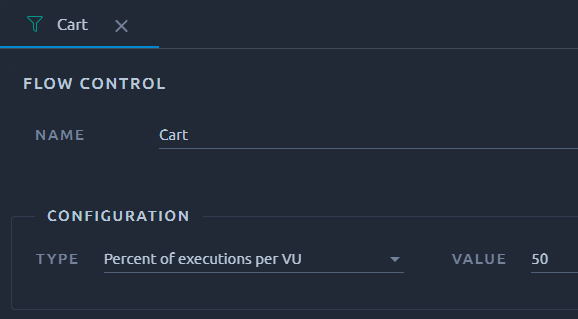{ align=left }
The flow control lets you **control how often** the contained actions are executed during a test.
!!! Warning
Be careful since only children of the flow control action will be impacted. Use the indentation to check that your flow control action is correctly setup.
It can be configured in two different modes:
* **Percent executions per VU**: causes the flow control to execute a certain percentage of the iterations through the Virtual User.
* **Total executions per VU**: causes the flow control to stop executing after a certain number of executions have occurred.
Parameter name | Description | Required
--- | --- | ---
Name | Descriptive name for this flow control which is indicated in the bench report. The name is not required, but it is a good habit to name your flow controls so that you can differentiate them in your bench reports. | No
Type | Percent executions or Total executions. More information above. | Yes
Value | If *Percent executions* type is selected, this value is the percent (between 0 and 100). If *Total execution* type is selected, this value is the total of executions. | Yes
## Percent executions
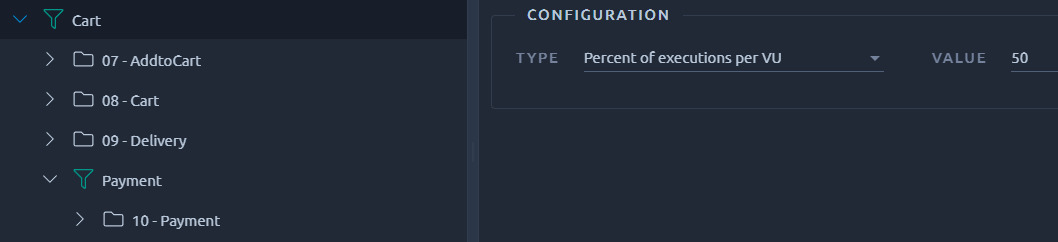
This mode is mainly used to reproduce a bounce rate.
For instance, not all users will proceed to the payment on a web store.
Instead as you advance in the purchasing tunnel, less and less users will stay.
Using Flow control is a good way to reproduce this.
To ensure this flow control runs at least once, you must make sure that your Virtual user will be able to run enough [iterations](https://api.octoperf.com/doc/runtime/edit-scenario/edit-user-profile/options/policies/#end).
Let's take a few examples to make that easier to understand:
- When set to 20% the flow control will execute every 5th iteration,
- When set to 10% the flow control will execute every 10th iteration,
- When set to 5% the flow control will execute every 20th iteration.
So if your test is too short, chances are you will never enter the flow control. This also means that [validations](https://api.octoperf.com/doc/design/edit-virtual-user/validation/) will not run the content of flow controls unless it is set to 100% because a validation is just **one iteration**.
!!! tip
You can download a JMX of this example here and import it in your project using the JMeter project option.
## Total executions

For those familiar with other load testing tools, it can be seen as an Init block, that is run only on first iteration (when set to 1).
This is useful for emulating a login that happens once only and then a bunch of iterations for the duration of the test.
Remember to not clear the cookies when doing so otherwise your login will be wiped on the second iteration.
!!! tip
You can download a JMX of this example here and import it in your project using the JMeter project option.