> OctoPerf's load testing - Results Table Report Item documentation page. Results Table Report Item edition and usage.
Source: https://api.octoperf.com/doc/analysis/edit-bench-report/report-items/results-table/
# Results Table Report Item
The results table provides overall statistics for each container or request.
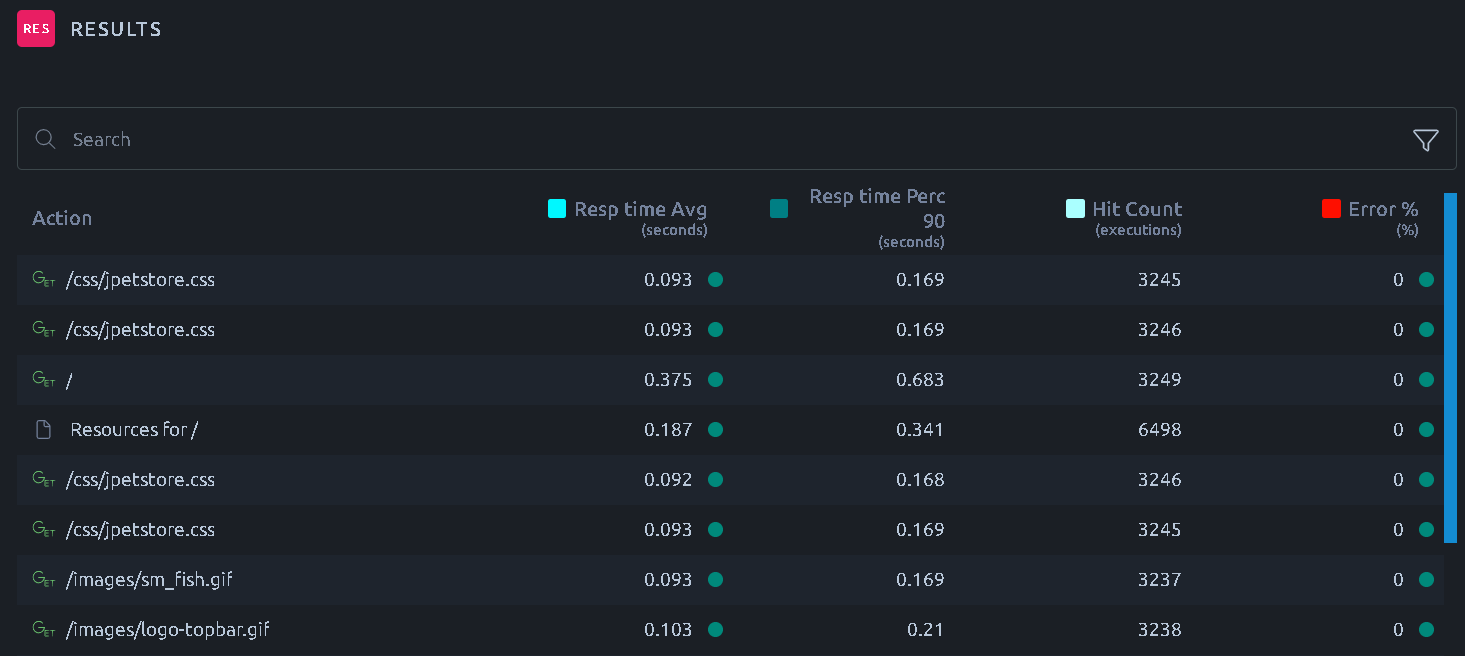
Several metrics are available, please report to the [Hit Metrics Availability](https://api.octoperf.com/doc/analysis/edit-bench-report/performance-metrics/#hit-metrics-availability) table.
!!! note
To customize a specific column, please refer to the documentation page about the [legend and metrics](https://api.octoperf.com/doc/analysis/edit-bench-report/metrics-selection/).
!!! info
When displaying statistics for HTTP requests, you may have two rows for each request if you selected [_Download Resources_ in your Virtual User](https://api.octoperf.com/doc/design/edit-virtual-user/action-types/http-actions/#download-resources).
* A row that displays statistics for the HTTP request itself:  * A row that displays statistics for all the HTTP request resources (Images, scripts, CSS files, etc.):
  ## Default report
The default report of a test shows a **Results Table - Requests**, with one row per request. When the Virtual Users of the test record containers, a **Results Table - Containers** comes first, with one row per container. The actions of a Playwright script, a navigation, a click or an assertion, are containers: a Playwright test always gets both tables.
## Create Line Chart
The **Create Line Chart** button of a row creates a line chart of the metrics of the table, for this row only, and inserts it below the table.
## Web Vitals
On the rows of the Playwright actions that loaded a page, a **Web Vitals** button sits next to **Create Line Chart**. It creates a line chart of the [Core Web Vitals](https://api.octoperf.com/doc/design/edit-virtual-user/action-types/playwright-actions/playwright-spec-action/#core-web-vitals) of that action, `LCP`, `INP` and `CLS`, and inserts it below the table.
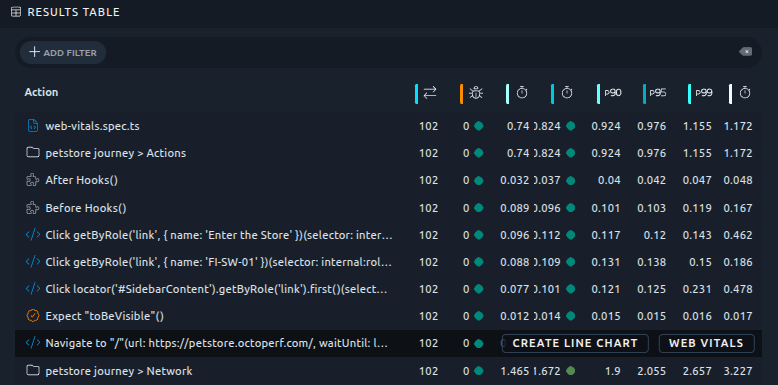
During a running test, the button shows up once the first iteration of the Virtual User has ended.
!!! note
**Create Line Chart** and **Web Vitals** are only offered on the report of a single test.
## Export
To export the table please refer to the [dedicated documentation page](https://api.octoperf.com/doc/analysis/export-bench-report/export-report-items/#exporting-tables).
## Default report
The default report of a test shows a **Results Table - Requests**, with one row per request. When the Virtual Users of the test record containers, a **Results Table - Containers** comes first, with one row per container. The actions of a Playwright script, a navigation, a click or an assertion, are containers: a Playwright test always gets both tables.
## Create Line Chart
The **Create Line Chart** button of a row creates a line chart of the metrics of the table, for this row only, and inserts it below the table.
## Web Vitals
On the rows of the Playwright actions that loaded a page, a **Web Vitals** button sits next to **Create Line Chart**. It creates a line chart of the [Core Web Vitals](https://api.octoperf.com/doc/design/edit-virtual-user/action-types/playwright-actions/playwright-spec-action/#core-web-vitals) of that action, `LCP`, `INP` and `CLS`, and inserts it below the table.

During a running test, the button shows up once the first iteration of the Virtual User has ended.
!!! note
**Create Line Chart** and **Web Vitals** are only offered on the report of a single test.
## Export
To export the table please refer to the [dedicated documentation page](https://api.octoperf.com/doc/analysis/export-bench-report/export-report-items/#exporting-tables).